Possibly 30% of the ad-hoc calls I receive in my Sydney computer repair business, relate to spyware or malware. These are best defined as follows:
- Spyware: software that hides itself away on your machine and watches what you do. Some examples: may watch you typing credit card numbers and funnel that information off to its creator. May watch what website you surf and send you targeted spam emails about those topics. Not what you’d want to happen!
- Malware: software that hides on your computer and makes changes to the way your machine operates. These changes may be very hard to undo, and the malware may offer to fix the problem for a small fee!
Unfortunately, it’s a fact of life that spyware/malware is much more prevalent on Microsoft Windows than on Mac. (In another blog post, I’ll talk about spyware and viruses on Mac, but I’m actually yet to witness Mac spyware first-hand: it’s that infrequent!)
Which spyware/malware is out there?
At the time of writing, most of the spyware / virus scenarios I walk into are the “Windows Recovery” spyware, discussed below. I’ve seen one single machine with a much, much worse situation (see below, in Worst-Case Scenario) but for the most part, machines are all getting infected with variants of the same thing.
Aside from Windows Recovery, my scans do find other, minor trojans and viruses, which are easily removed with normal virus and malware removal tools. I make special mention of the Windows Recovery malware because it’s so prevalent and it’s a bit of a pain to remove it. It’s also different each time I see it, which might be because the writer’s are still ‘improving’ it or because some clients may have helped it ‘dig in’ further than others.
Windows Recovery malware
This delightful software does the following:
- installs itself as a hidden process, or with the name of a normal Windows process
- marks large numbers of your files as “hidden”. Windows by default doesn’t display hidden files so it looks like the files are gone. Examples of what goes missing:
- Internet Explorer Favorites
- My Documents
- My Pictures
- Everything on your desktop
- Everything in the Start Menu
- The contents of the Quick Launch toolbar at the bottom of the Windows screen.
- displays a prominent window on the screen, warning of many problems with your computer. This uses standard Windows colours for Windows XP, Vista and Windows 7 (which makes it look more legitimate). Messages displayed include those shown below:
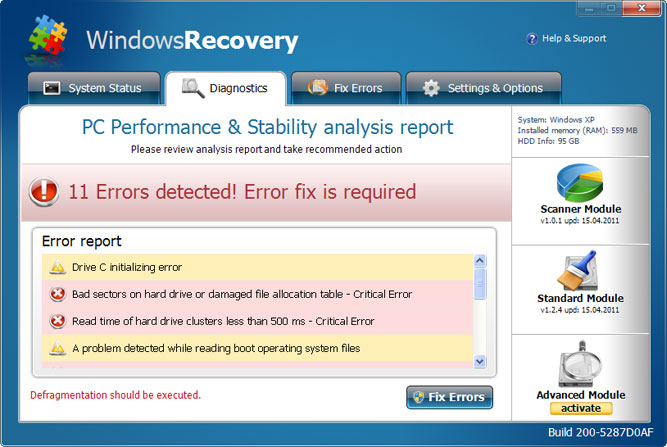
- Running the Standard ‘Fix Errors’ seems to just help the software dig itself in even deeper. Running the ‘Advanced Module’, surprise, requires payment!
- The good news is, none of the errors it’s reporting are actually true.
- Once the malware is installed, it may even take steps to prevent your antivirus software from running and may block attempts to get to antivirus software websites.
Why do people create software like this?
The prime reason for Windows Recovery is to make money. The software brings up big scary messages, hides your files to make it look like there really is a problem, then offers a fix for the issue, for only $49 (or so clients have told me).
How do they get it onto my PC?
I’ve not seen the initial infection process, but I think it goes something like this:
- user goes to a website that’s hosting the Recovery installer.
- the website puts up a screen of scary warning messages, within your web browser (Internet Explorer mainly seems to be the one affected). Most everything within that error screen is a link which will attempt to download and install Recovery if you click any of the links.
- people will click on anything, if they think it will make the problem go away. Within two or three clicks, the malware is installed.
What software can I install to prevent it?
Herein lies the problem – in my visits to clients I have seen most of the major software vendors fail to prevent this infection. Although people have antivirus software from the big names, this infection still manages to get through the net. The best approach is to run a good antivirus product, and take a commonsense attitude when on the internet: if messages appear that you’re not expecting and which didn’t directly result from something you clicked on, you should regard the entire situation as suspect and proceed with extreme caution.
It’s also important to note that if you think your computer’s infected, googling for a fix will often direct you to websites that want to infect you further.
Also strongly consider not running Internet Explorer. For example, I’ve found that people who use Google’s web browser, Chrome, seem to avoid this infection.
How can I remove it?
The Windows Recovery malware itself can be removed with most good antimalware software. The damage that it has done during the infection is a bit harder to undo. I’m still finding each new version I come across has new tricks up its sleeve.
Worst-case scenario
I have seen one machine in this last year which contained a type of malware that’s really of great concern: the so-called rootkit. This is a form of virus that hides itself on the machine so well, that many antivirus products cannot find it at all. There are rootkits which can even survive wiping the hard drive completely (without the right cleaning software). My current opinion is that if rootkit activity is suspected, and if you’re running any aspect of a business on the machine, a complete wipe (including boot sectors) is the only way to be sure the infection is gone. An IT professional will be able to preserve your data before wiping the hard drive.
I’ll discuss rootkits further in a later blog post.
If you enjoyed this article, please consider sharing it!


